Ball Pit Simulator Ball Pit Settings Guide
How configurable pit options, physics toggles, and polite lobby habits keep the playground fun for everyone.
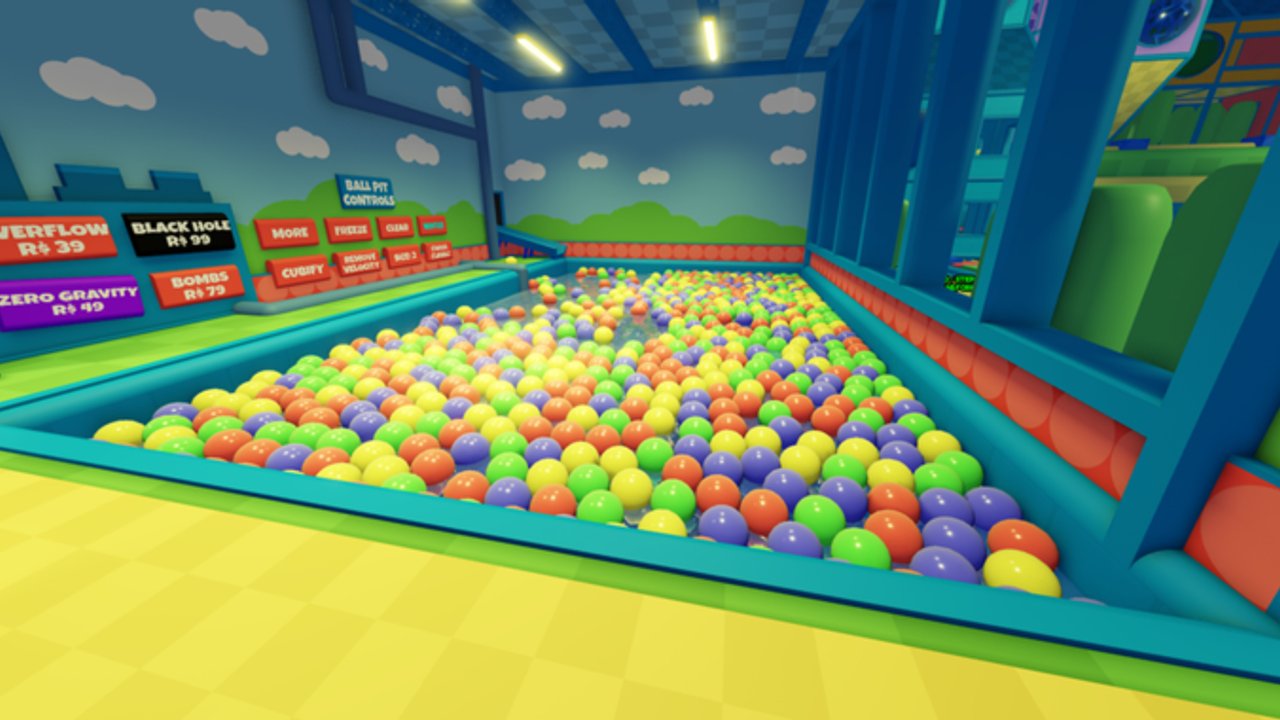
One of Ball Pit Simulator’s signature hooks is a configurable ball pit. Players can change how the colorful ocean of balls behaves—overflow styles, gravity tricks, visual themes, and chaos toggles that turn a calm swim into a comedy reel. This guide explains how to think about those settings, how to change them without wrecking someone else’s roleplay, and how to recover when physics leave you stuck. Pair it with Getting Started if you are still learning the floor plan, and with Controls when camera or jump timing is the real problem.
What “configurable” usually means here
The Roblox listing for Patch’s Ball Pit! highlights a playground you can tune. In practice, lobbies expose options that reshape the pit experience. Categories players commonly talk about include:
- Overflow / fill behavior — how aggressively balls stack, spill, or refill the basin
- Black hole–style sinks — pulls that yank avatars or balls toward a dramatic center
- Low gravity — floatier jumps and slower falls that change trampoline routes
- Bombs / burst chaos — explosive novelty that scatters balls and players
- Color and theme packs — visual swaps that keep screenshots fresh
Exact menu labels can shift after publishes. When the Roblox Updated stamp moves, re-check in-world UI and skim Latest Update instead of trusting an old screenshot from a random video.
Robux, free toggles, and honesty
Some cosmetic or premium pit options may require Robux. This wiki does not invent prices, shop SKUs, or limited-time bundles. Read the purchase prompt carefully, confirm you are buying what you think you are buying, and never trust a stranger who offers a “free settings unlock script.” That pitch belongs in the reject pile with everything covered in Scripts Safety.
Core pit play remains free: you can dive, bounce, crawl, and roleplay without paying. Treat paid toggles as optional spice, not a requirement to belong.
Who should change settings—and when
Server size is 50, maturity is Ages 5+, and VIP servers are not creatable for this place. That means public lobbies are shared spaces. Before flipping physics:
- Glance at chat—are people mid-roleplay wedding, king court, or quiet hangout?
- Ask once: “mind if I try low gravity for a minute?”
- Prefer short experiments over permanent chaos when the lobby is full of younger players.
- If someone asks to revert, revert. Being the settings hero is not worth a report storm.
- After a big change, announce it so trampoline runners and tube crawlers can adjust.
Changing gravity mid-show can ruin a carefully timed trampoline chain. Changing overflow while someone is buried for comedy is funny once and cruel the fifth time. Etiquette beats novelty.
Physics modes and how they feel
Overflow and dense fills
Heavy fill makes “swimming” slower and exits harder to see. Use short movement taps, jump to pop your camera above the surface, and aim for brighter rim light. See stuck tips below if you truly clip.
Black hole / sink effects
Expect sudden pulls. Do not stand AFK on a rim above a sink if you dislike surprise launches. Warn friends before enabling so caregivers in family RP can park kids somewhere safe.
Low gravity
Jumps hang longer, so trampoline landings drift. Re-center the camera mid-air and approach pads slower than usual. Cross-train with the dedicated Trampolines guide once you want route practice under weird physics.
Bombs and burst toys
Great for fifteen-second chaos clips; poor for hide-and-seek fairness. Disable before competitive mini-games or when someone is documenting a careful explore of Secrets and Hidden Areas.
Color swaps
Lowest-drama change. Still announce if a colorblind teammate relies on a landmark hue you just replaced.
Stuck-in-balls troubleshooting
Getting buried is part of the joke until collision bugs trap you.
| Symptom | Try this |
|---|---|
| Soft stuck, can wiggle | Jump repeatedly + move toward light / rim |
| Camera inside balls | Zoom out, tilt up, walk while jumping |
| Hard clip after physics toggle | Ask lobby to revert setting, then retry |
| Still frozen after a minute | Reset character from Roblox menu |
| Reset fails or loop-clips | Leave and rejoin the experience |
Never install a “stuck fix” executor. Rejoin is safer and keeps your account intact (Scripts Safety).
Settings + other attractions
- Trampolines — retune timing after gravity changes; see Trampolines.
- Tunnels — dense overflow near mouths can hide entrances; walk rims slowly (Tunnels and Tubes).
- Arcade — physics toys rarely help ticket focus; park chaos before grinding (Tickets and Arcade).
- Exploration — weird pockets are easier to judge when gravity is normal (Secrets and Hidden Areas).
Session recipe: settings lab (20 minutes)
- Join and watch the lobby mood for two minutes.
- Ask permission, then try one toggle only.
- Run a short pit dive and one trampoline hop under the new rule.
- Revert, thank the lobby, and note what felt fun versus exhausting.
- Check the Roblox Updated date so your notes stay honest after republishes.
Myths to ignore
- “Secret admin settings only scripts can open” — scam bait.
- “Infinite overflow farm equals free limiteds” — wrong-game fantasy; this is not a tycoon.
- “VIP private physics lobby” — VIP servers are not creatable here; share the public space kindly.
- “Badges unlock pit modes” — this experience has no badges; do not chase fake badge guides.
Related pages
- Getting Started
- Controls
- Trampolines
- Secrets and Hidden Areas
- Latest Update
- Scripts Safety
- Guides Hub
Tune the pit for laughter, not for power trips—and leave the next lobby a calmer ocean than you found.
Frequently Asked Questions
Quick answers to the most common questions.
Do I need Robux to enjoy the ball pit?
No. Core diving, bouncing, tunnels, arcade, and roleplay work free. Some optional toggles or cosmetics may cost Robux—read prompts and skip anything you do not want.
Can I lock a private lobby for custom physics?
VIP servers are not creatable for this place. Coordinate politely in public 50-player servers instead.
What should I do if I am stuck in the balls?
Jump toward light, ask for a settings revert if physics caused the clip, reset your character, then rejoin if needed. Avoid exploit “unstuck” tools.
Is it rude to change gravity during roleplay?
Usually yes unless the scene asked for chaos. Ask first, keep experiments short, and revert when someone objects.
Where do I confirm settings still match this guide?
Check in-world UI after any Roblox Updated change and skim Latest Update.